How Push Button Switches Work: Momentary vs Maintained
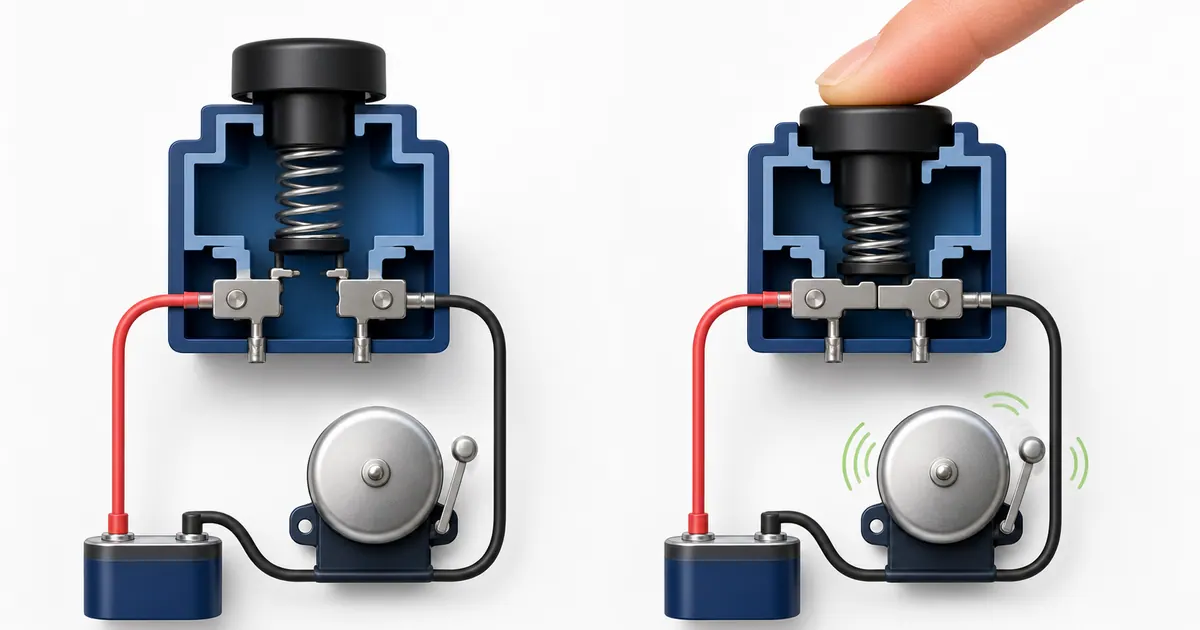
A push button is one of the simplest electrical controls: press it to change a contact, then release it and a spring returns the button to its normal position. That brief action is why it is called a momentary switch.
Doorbells are the familiar example, but the same principle appears in machine controls, access systems, alarms, lift controls, test equipment, and industrial start/stop stations. The important details are what the contact does at rest, what changes while pressed, and whether another part of the circuit keeps the equipment running afterward.

Safety note: This article explains operating principles, not a procedure for installing mains wiring or machinery controls. Never assume a cable is safe because it looks like low-voltage wiring. Isolate and verify electrical supplies before work, and use a competent electrician or control-panel professional where required.
The Quick Answer
A momentary push button has an actuator, a return spring, and one or more electrical contacts.
- A normally open (NO) contact is open while the button is untouched. Pressing the button closes it and allows current to flow.
- A normally closed (NC) contact is closed while the button is untouched. Pressing the button opens it and interrupts current.
- Releasing a momentary button lets its spring return the actuator and contacts to their normal state.
- A maintained or latching button stays in its changed state until it is pressed again, turned, or mechanically reset.
Momentary and NO do not mean the same thing. Momentary describes how the button returns; NO or NC describes the contact’s electrical state when the button is not being operated. Manufacturers therefore offer momentary buttons with NO contacts, NC contacts, or both. OMRON’s pushbutton switch guide explains the momentary and alternate actions, while its A22 product lineup shows several possible contact arrangements.
Momentary vs Maintained Push Buttons
The mechanical action determines what happens after your finger leaves the control.
| Button action | While pressed | After release | Common examples |
|---|---|---|---|
| Momentary | Contact changes state | Spring returns it immediately | Doorbell, start button, test button |
| Maintained | Contact changes state | New state remains until another action | Push-on/push-off lamp, selector control |
What is a Maintained Contact Push Button?
A maintained contact push button (often called a latching push button or alternate-action switch) stays in its activated state after being pressed. Instead of springing back immediately like a momentary switch, internal mechanical latching holds the contacts in place. A second press (or twist-to-release action on an emergency stop) releases the latch and returns the contacts to their normal resting state.
A doorbell button normally needs only a short pulse, so a momentary action makes sense. A table-lamp button or machine power button may need to remember whether power is on, so it can use a maintained contact push button instead.
Some systems use a momentary button but still keep the equipment running. In that case, the button is not doing the remembering. A relay, contactor auxiliary contact, electronic controller, or software input provides the holding logic.
Normally Open and Normally Closed Contacts
The word normally refers to the device in its unoperated, resting condition. It does not mean the state used most often during the day.
| Contact | Resting state | State while pressed | Typical role |
|---|---|---|---|
| NO, normally open | Current path is broken | Path closes | Doorbell, machine start, request input |
| NC, normally closed | Current path is complete | Path opens | Machine stop, limit or interlock input |
| NO + NC changeover | One path open, one closed | The states exchange | Control logic needing both signals |
Schneider Electric’s NO and NC contact explanation uses the same at-rest definition.
Push-to-Make
A normally open momentary button is often called push-to-make. Pressing it makes the electrical connection. This is the usual arrangement for a traditional doorbell because the chime should be energised only during the press.
Push-to-Break
A normally closed momentary button is often called push-to-break. Pressing it breaks an existing path. NC contacts are common in control and monitoring circuits because an open path can represent a stop request, an operated limit, or a broken control wire, depending on the complete design.
For the matching diagram symbols, see the electrical circuit symbols reference.
What Happens Inside the Button?
Although push buttons come in many shapes, the basic parts are similar:
- The button cap or actuator is the part you press.
- A plunger transfers that movement into the body of the switch.
- A return spring pushes the plunger back when pressure is removed.
- A moving contact changes position against one or more fixed contacts.
- Terminals connect those contacts to the external circuit.
In a simple NO button, the contacts begin separated. Pressing the actuator compresses the spring and moves a conductive bridge until it touches both fixed contacts. That closes the path. Releasing the actuator lets the spring lift the bridge away again.
An NC button uses the opposite contact sequence: its path exists at rest and opens during the press. A changeover block can expose a shared COM terminal plus separate NO and NC terminals. On that type, COM means the contact common to the two possible paths. A basic two-terminal push-to-make button may simply have two interchangeable contact terminals and no separate COM marking.
How a Traditional Wired Doorbell Uses a Push Button
A simple wired doorbell usually combines a low-voltage transformer, a momentary NO bell push, and a chime or bell.
Transformer secondary -> Push button (NO) -> Chime -> Transformer return
At rest, the open button interrupts the loop and the chime is silent. Pressing the button closes the loop, so the transformer energises the chime. Releasing it opens the loop again.
Official wired-chime products illustrate this low-voltage arrangement: Resideo lists an 8-12 V AC wired chime, while Honeywell Home documents a wired chime kit that included bell pushes and a transformer.
Smart and video doorbells can work differently because the door unit may need continuous power for its camera, network connection, and electronics. Do not assume their terminals behave like a simple dry-contact bell push. Follow the exact manufacturer’s instructions; the smart doorbell guide explains the distinction in more detail.
How Start and Stop Buttons Control a Contactor
Industrial controls often pair two momentary buttons:
- START uses an NO contact.
- STOP uses an NC contact.
A simplified three-wire contactor control path looks like this:
                              +-- START (NO) --+
Control supply -> STOP (NC) --+                +-> Contactor coil -> Return
                              +-- AUX (NO) ----+
Pressing START energises the contactor coil. When the contactor operates, its NO auxiliary holding contact closes in parallel with START. The auxiliary path then keeps the coil energised after START is released. Pressing STOP opens the series NC path, the coil drops out, and the holding contact opens too.
This is why a momentary START button can start a motor that continues running: the contactor’s auxiliary contact, not the button, maintains the control circuit. Schneider Electric describes this start/stop three-wire control sequence and the role of a holding contact.
Read What Is a Contactor and How Does It Work? for the wider distinction between its control circuit and main power contacts.
A Normal Push Button Is Not an Emergency Stop
A red button does not automatically become an emergency-stop device.
An emergency stop is a purpose-built safety control. Depending on the machine and applicable standards, its design can include a latching action, direct-opening NC contacts, a red actuator on a yellow background, manual reset, monitored circuits, and safety-rated control hardware. Resetting it should not itself restart the machine.
OMRON’s emergency pushbutton guidance distinguishes emergency controls from ordinary stop switches, and Eaton’s emergency-stop design guide explains the latching, direct-opening, and reset principles.
Never substitute an ordinary momentary button for a required safety function. Machine risk assessment, stop-category design, redundancy, testing, and compliance belong to a competent machine-safety professional.
Try a Momentary Push Button in ElectraSim
ElectraSim models its Push Button as a two-terminal, normally open momentary path. The clearest exercise is a bell circuit:
- Open ElectraSim and add Live, Neutral, Push Button, and Bell components.
- Connect
Live -> Push Button -> Bell -> Neutral. - Start the simulation.
- Press and hold the centre control on the Push Button. Its pressed state activates, the path closes, and the Bell energises.
- Release the pointer. The button returns to its released state, the path opens, and the Bell de-energises.
- For keyboard operation, focus the button control and hold
SpaceorEnter, then release the key.
You can replace the Bell with a Bulb to make the same change visible rather than audible.
ElectraSim’s current Contactor component represents its energised or de-energised state as a manual control. It does not expose separate coil or auxiliary-contact terminals, so use the contactor section above to understand the real-world principle rather than treating the simulator as a complete motor-starter design tool.
Common Push Button Mistakes
Treating Momentary and Normally Open as Synonyms
A momentary button can be NO, NC, or a combination of both. Check the action and the contact arrangement separately.
Reading NO and NC as the Powered State
Normal means untouched and unoperated. Determine the resting state before thinking about what the circuit does when energised.
Using the Wrong Terminals
On a COM/NO/NC contact block, COM-to-NO behaves differently from COM-to-NC. Use the manufacturer’s terminal diagram and device markings rather than relying on position or wire colour.
Expecting the Button to Latch a Load
A momentary NO button stops conducting when released. A circuit that must remain on needs suitable holding logic, such as a contactor auxiliary circuit or controller.
Switching a Large Load Directly
Push button contact ratings differ widely. Industrial buttons often signal a relay, contactor, or controller rather than carrying the machine’s main load. Use the manufacturer’s utilisation category, voltage, and current ratings for the exact load.
Treating Low Voltage as Automatically Safe
Low-voltage control cable can be beside or connected through equipment containing dangerous supplies. The UK HSE advises against identifying voltage from cable colour or appearance and describes secure isolation and verification as essential before work.
Frequently Asked Questions
Does a push button stay on after I release it?
A momentary push button does not. Its spring returns it to the normal state. A maintained button stays changed, while a separate relay, contactor, or controller can make a system remain on after a momentary command.
Is a doorbell button normally open or normally closed?
A traditional simple bell push is usually normally open. Pressing it closes the low-voltage chime circuit. Smart doorbells may use a different continuously powered arrangement.
What do COM, NO, and NC mean?
COM is the common terminal. With the button at rest, COM connects to NC and remains disconnected from NO. Operating the button reverses those contact states on a typical changeover block.
Why is a machine STOP button often normally closed?
An NC stop contact carries the control path during normal operation and opens when pressed. In a properly designed system, a break in that series path can also prevent the contactor from remaining energised. This principle alone does not make a circuit safety-rated.
Can I use a push button instead of a normal light switch?
Only if the complete control system is designed for momentary input, such as an impulse relay or smart controller. A simple NO momentary button wired as the only control would keep the light on only while held.
Can ElectraSim model both NO and NC push buttons?
The current Push Button component models a normally open momentary contact. It closes while pressed and opens when released. NC and changeover push-button contact blocks are useful real-world concepts but are not separate simulator components yet.
Key Takeaways
- Momentary describes a button that returns when released.
- NO and NC describe the contact state while the button is at rest.
- A doorbell commonly uses an NO push-to-make button.
- Industrial START is commonly NO; STOP is commonly NC.
- A contactor auxiliary contact or controller provides holding logic after a momentary press.
- COM is the shared terminal on a changeover contact block.
- An ordinary push button is not a substitute for a safety-rated emergency stop.
- In ElectraSim, the Push Button closes its two-terminal path only while you hold it.
Build the simple Bell exercise in ElectraSim to see the contact change without working on a real installation.
See It All in Action
Build and simulate the circuits from this article for free in your browser. No installation, no sign-up.
Open ElectraSim Free